Study Browser
The Study Browser is a component that allows users to browse and manage studies.
studyBrowser.studyMode
| ID | studyBrowser.studyMode |
|---|---|
| Description | Controls the study browser mode to determine whether to show all studies (including prior studies) or only the current study. |
| Default Value | 'all' |
| Example | |
studyBrowser.viewPresets
| ID | studyBrowser.viewPresets |
|---|---|
| Description | Defines the view presets for the study browser, such as list or thumbnail views. |
| Default Value |
[
  {
    "id": "list",
    "iconName": "ListView",
    "selected": false
  },
  {
    "id": "thumbnails",
    "iconName": "ThumbnailView",
    "selected": true
  }
] |
| Example | |
studyBrowser.sortFunctions
| ID | studyBrowser.sortFunctions |
|---|---|
| Description | Sorting options for study browser items. 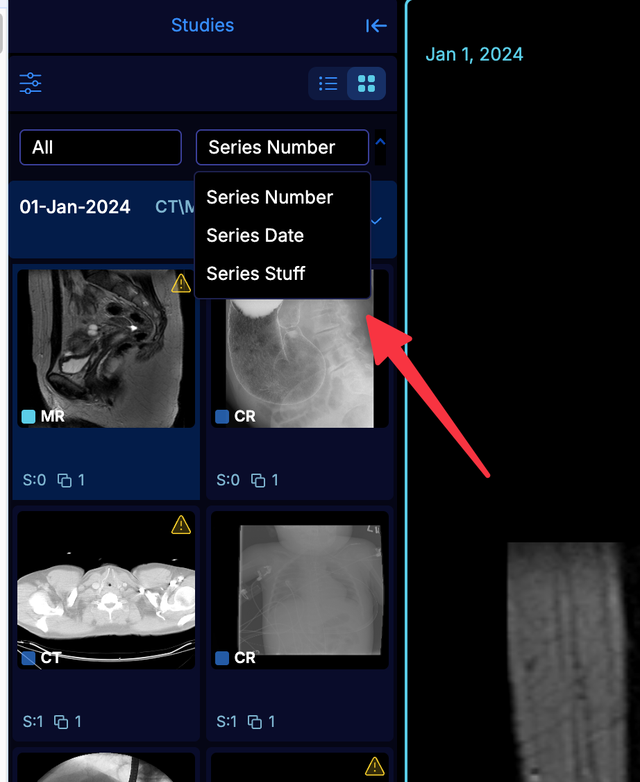 |
| Default Value |
[
  {
    "label": "Series Number"
  },
  {
    "label": "Series Date"
  }
] |
| Example | |
studyBrowser.thumbnailMenuItems
| ID | studyBrowser.thumbnailMenuItems |
|---|---|
| Description | Defines the menu items available in the thumbnail menu items of the study browser. 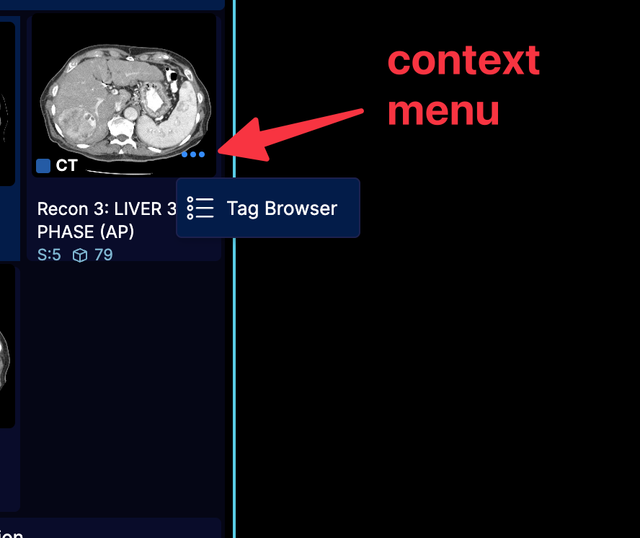 |
| Default Value |
[
  {
    "id": "tagBrowser",
    "label": "Tag Browser",
    "iconName": "DicomTagBrowser",
    "commands": "openDICOMTagViewer"
  }
] |
| Example | |
studyBrowser.thumbnailDetails
| ID | studyBrowser.thumbnailDetails |
|---|---|
| Description | The items on the detail line of a study browser thumbnail, under the modality and series description. Declared the same way as the viewport overlay items: each has an `id`, an optional `condition` deciding whether to include it, and a value taken from its `contentF`, from a named `source`, or from an `attribute` of the instance the display set shows. `label` prefixes the value, `title` is its tooltip, and `iconName` puts an icon before it. An item with no value is left out. `condition` and `iconName` may each be a function or a name, so the whole line can be declared as data - see `studyBrowser.thumbnailDetailSources` and `studyBrowser.thumbnailDetailTests` for the names, and `?customization=studyBrowser/derivedDateTime` for an example of adding the creation date/time that derived series are sorted by. An item naming a source or test that is not registered is left out with a warning; if that leaves no items at all, the thumbnail keeps its default detail line rather than showing an empty one. |
| Default Value |
[
  {
    "id": "SeriesNumber",
    "label": "S:",
    "source": "seriesNumber"
  },
  {
    "id": "InstanceCount",
    "source": "numInstances"
  }
] |
| Example | |
studyBrowser.thumbnailDetailSources
| ID | studyBrowser.thumbnailDetailSources |
|---|---|
| Description | Named value sources a `studyBrowser.thumbnailDetails` item can point at with `source`, instead of supplying a `contentF` function. Each is called with `{ displaySet, instance, formatters }`, where `instance` is the instance the display set shows. `instanceDateTime` is the creation date/time that the series list is sorted by, formatted to the minute. Add to it with `$merge`, as a `$set` replaces the whole registry and so takes away the sources the default items name. |
| Default Value |
{
  "instanceDateTime": "(the creation date/time, see getLatestInstanceDateTime)"
} |
| Example | |
studyBrowser.thumbnailDetailTests
| ID | studyBrowser.thumbnailDetailTests |
|---|---|
| Description | Named tests a `studyBrowser.thumbnailDetails` item can point at with `condition`, instead of supplying a function. Each is called with the same properties as a source and returns whether to include the item. |
| Default Value | {} |
| Example | |
studyBrowser.studyMenuItems
| ID | studyBrowser.studyMenuItems |
|---|---|
| Description | Defines the menu items available in the study menu items of the study browser. 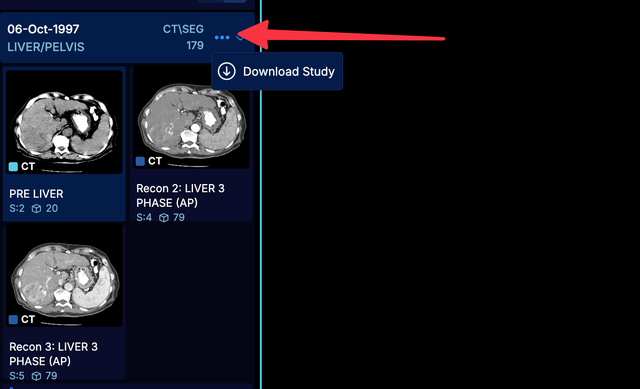 |
| Default Value | [] |
| Example | |
studyBrowser.thumbnailDoubleClickCallback
| ID | studyBrowser.thumbnailDoubleClickCallback |
|---|---|
| Description | Defines the callback function for when the user double clicks a series on the study browser. |
| Default Value |
{
    callback: ({
            activeViewportId,
            servicesManager,
            isHangingProtocolLayout
        }) =>
        async displaySetInstanceUID => {
            const {
                hangingProtocolService,
                viewportGridService,
                uiNotificationService
            } =
            servicesManager.services;
            let updatedViewports = [];
            const viewportId = activeViewportId;

            try {
                updatedViewports = hangingProtocolService.getViewportsRequireUpdate(
                    viewportId,
                    displaySetInstanceUID,
                    isHangingProtocolLayout
                );
            } catch (error) {
                console.warn(error);
                uiNotificationService.show({
                    title: 'Thumbnail Double Click',
                    message: 'The selected display sets could not be added to the viewport.',
                    type: 'error',
                    duration: 3000,
                });
            }

            commandsManager.run({
              commandName: 'setDisplaySetsForViewports',
              commandOptions: { viewportsToUpdate: updatedViewports },
            });
        },
} |
| Example | |
instanceSortingCriteria
| ID | instanceSortingCriteria |
|---|---|
| Description | Defines the instance sorting criteria to sort the images |
| Default Value |
{
    sortFunctions: {},
    defaultSortFunctionName: '',
} |
| Example | |